Building Nova Drop · Part 2 of 6
Making merges feel oddly satisfying: juice on one CustomPainter
TL;DR — Part 1 left us with a correct but lifeless physics solver. This post is the "juice": a lightweight particle system (bursts, imploding rings, floating score), screen shake and a white flash, reactive audio whose volume tracks impact speed, and an escalation curve — chains → Fever → the screen-clearing Supernova — where each merge dials everything up. It's all driven by one ChangeNotifier game loop and drawn by a single CustomPainter.
"Oddly satisfying" is the entire pitch of a merge puzzle, and it's almost all game feel. The physics decides where things go; the juice decides whether landing a four-chain feels like a firework or a spreadsheet update. None of it touches the simulation from Part 1 — the world just emits MergeEvents and impact intensities, and a layer on top turns those into light, motion, haptics and sound.
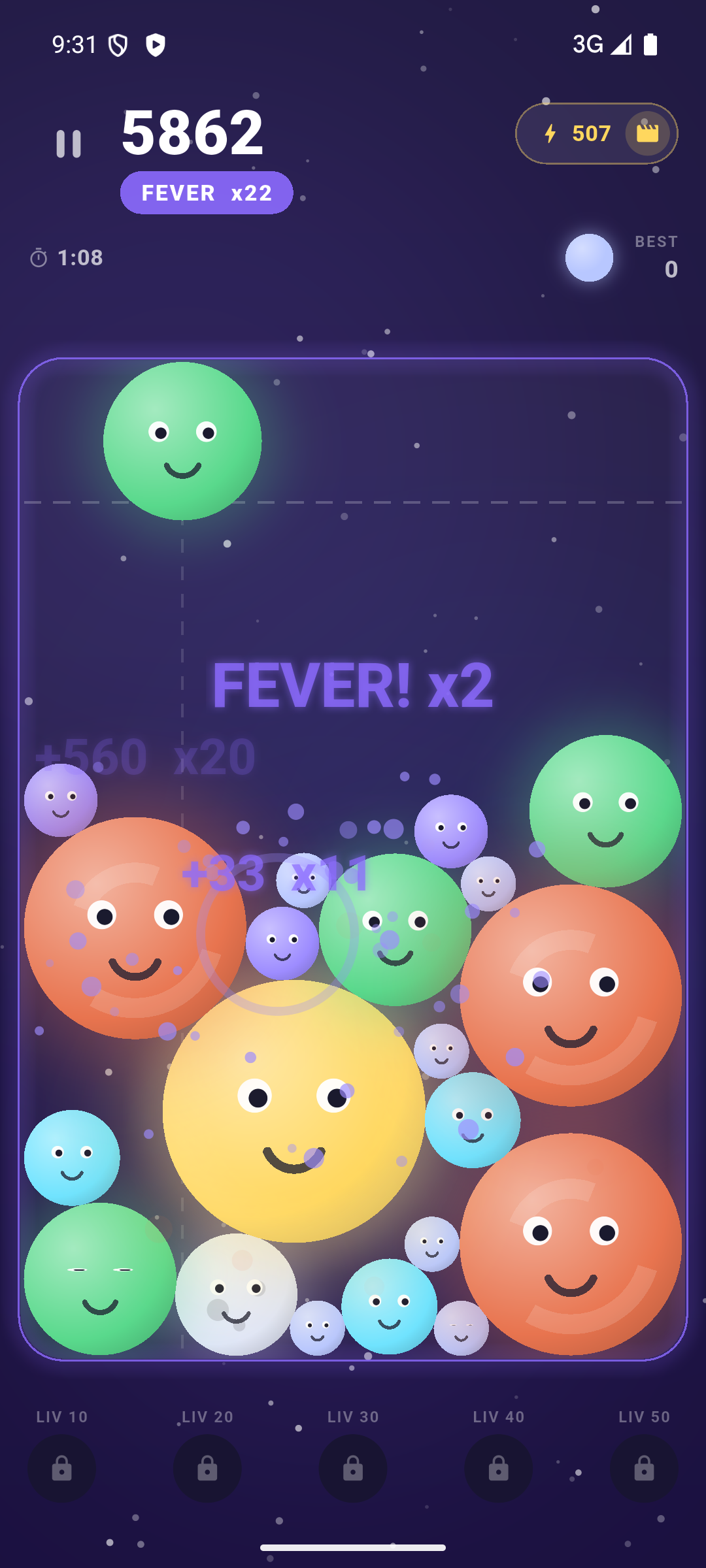
+points ×multiplier, scaled up by the current chain length.One loop, one painter
The architecture is intentionally flat. GameController is a ChangeNotifier that owns all the state — the physics world, the particle system, score, chain, and a handful of decaying "effect" scalars. The game screen drives it with a Ticker (one update(dt) per frame), and a single CustomPainter reads the controller and the particle lists and paints the whole scene: bodies, particles, rings, floating text, the danger line. No widget per body, no animation controllers — just immutable-ish state mutated each tick and repainted.
class GameController extends ChangeNotifier {
  PhysicsWorld? world;
  final ParticleSystem particles = ParticleSystem();
  double shake = 0;   // screen-shake intensity, read by the painter
  double flash = 0;   // white flash (Supernova / Big Bang)
  // …score, chain, fever…

  void update(double dt) {
    dt = math.min(dt, 1 / 20);   // clamp: no giant jumps after a stall
    _stepPhysics(dt);            // Part 1 — emits merges & impacts
    particles.update(dt);
    shake = math.max(0, shake - dt * 18);    // ease back to rest
    flash = math.max(0, flash - dt * 2.2);
    notifyListeners();           // one repaint per frame
  }
}
The "effects" — shake and flash — are just numbers that get spiked by an event and decay every frame. The painter offsets the canvas by a shake-scaled random jitter and overlays a white rectangle at flash opacity. Cheap, and because they're plain scalars they compose: two merges in quick succession stack their shake.
The particle system: flat lists, no per-frame allocation
The particle system is about 180 lines and holds three flat lists — particles, rings, floating texts. Updating them is a reverse loop that removes the dead ones in place; the only allocation is at emission time. Particles get a soft drag and a gentle gravity so a burst arcs nicely instead of flying in straight lines:
void update(double dt) {
  for (var i = particles.length - 1; i >= 0; i--) {
    final p = particles[i];
    p.life -= dt;
    if (p.life <= 0) { particles.removeAt(i); continue; }
    p.vel *= 0.96;                  // drag
    p.vel += Offset(0, 220 * dt);   // a little gravity
    p.pos += p.vel * dt;
  }
  // rings expand on an ease-out curve; floating text drifts up and fades
}
Rings expand on an ease-out cubic so they snap out fast and settle — that curve is what reads as "impact" rather than "growing circle." It's hand-rolled so the particle system stays independent of Flutter's animation library:
static double easeOutCubic(double t) { final i = 1 - t; return 1 - i * i * i; }
// per ring, each frame:
r.radius = r.maxRadius * easeOutCubic(1 - r.life / r.maxLife);
There are two emitters worth calling out. burst is the obvious one — N particles fired in random directions with jittered speed, size and lifetime so no two bursts look stamped. Its mirror image, implode, spawns particles on an outer ring and aims them inward, with velocity tuned to arrive at the centre exactly as they die — the visual grammar of a Nova or a black hole sucking everything in:
void implode(Offset center, Color color, {int count = 16, double radius = 160, ...}) {
  for (var i = 0; i < count; i++) {
    final angle = _rng.nextDouble() * 2 * math.pi;
    final pos = center + Offset(math.cos(angle), math.sin(angle)) * radius * (0.6 + _rng.nextDouble() * 0.4);
    final life = /* jittered */;
    final vel = (center - pos) / life;   // arrive at the centre as it dies
    particles.add(Particle(pos: pos, vel: vel, maxLife: life, color: color, glow: true));
  }
}
The escalation curve: every merge dials it up
The core feedback loop lives in _onMerge, and its guiding rule is simple: the longer your chain, the more of everything you get — more particles, faster particles, a bigger ring, a louder pop, heavier haptics, more shake. A chain is just merges landed inside a 1.4 s rolling window:
void _onMerge(MergeEvent e) {
  chain += 1;
  _chainTimer = GameConstants.chainWindowSeconds;   // 1.4 s window resets
  final multiplier = chain * (fever ? 2 : 1);
  score += (GameConstants.mergeScore[e.resultTier] * multiplier * stormMult).round();

  final color = palette.tierColors[e.resultTier];
  particles.burst(e.position, color, count: 10 + chain * 3, speed: 200 + chain * 40, size: 4 + e.resultTier.toDouble());
  particles.ring(e.position, color, maxRadius: radius * 2.2, width: 3 + chain.toDouble());
  particles.floatText(e.position - Offset(0, radius),
      multiplier > 1 ? '+$points  x$multiplier' : '+$points',
      multiplier > 1 ? palette.accent : Colors.white);

  AudioService.instance.playChainPop(chain - 1);    // pitch climbs with the chain
  if (chain >= 4) Haptics.heavy(); else if (e.resultTier >= 5) Haptics.medium(); else Haptics.light();
  shake = math.min(1.0, (0.08 + chain * 0.06 + e.resultTier * 0.02) * difficulty.juiceScale);
}
Three details do a lot of heavy lifting:
- Pitch that climbs.
playChainPop(chain - 1)raises the pop's pitch with each link, so a chain literally sounds like it's ascending — the single most "satisfying" audio trick in the game. - Haptics tiered by stakes. A bigger tier or a longer chain gets a heavier buzz, so your thumb feels the difference between a routine fuse and a big one without looking.
- Float-text that grows. The score popup scales with the chain, capped so it never takes over the screen.
One more multiplier sits on top of all of it: the chosen difficulty has a juiceScale (0.85 on Easy up to 1.5 on Inferno) that the shake — and other effects — are multiplied by. The harder you play, the harder the game physically hits back.
Fever
Hit a five-chain and the game tips into Fever: a six-second window where every merge scores double. It announces itself with big floating text and a full device vibrate, then quietly counts itself down in update:
if (chain >= GameConstants.feverChain && !fever) {   // feverChain = 5
  fever = true; _feverTimer = GameConstants.feverSeconds; // 6 s
  particles.floatText(center, 'FEVER! x2', palette.accent, scale: 2.0, life: 1.4);
  Haptics.vibrate();
}
The Supernova: the trophy moment
Fuse two Neutron Stars — the top tier — and the game spends its entire effects budget at once. The clearRadius from Part 1 wipes ~90% of the field; then comes a long whiteout, a violent shake, three concentric rings and well over a hundred particles. It is meant to feel like the end of a world, and it's the moment the game nudges you to share:
void _onSupernova(Offset center) {
  final cleared = world.clearRadius(center, world.board.width * 0.9);  // ~90%
  flash = 1.8;   // long whiteout
  shake = 3 * difficulty.juiceScale;   // violent (and scaled by difficulty)
  particles.ring(center, Colors.white, maxRadius: w.width * 1.5, width: 20);
  particles.ring(center, palette.accent, maxRadius: w.width * 1.2, width: 12);
  particles.ring(center, Colors.white, maxRadius: w.width * 0.7, width: 8);
  particles.burst(center, Colors.white, count: 120, speed: 900, size: 8, life: 1.4);
  particles.burst(center, palette.accent, count: 60, speed: 500);
  particles.floatText(center, 'SUPERNOVA! +$bonus', Colors.white, scale: 2.2, life: 2.0);
  AudioService.instance.play(Sfx.supernova);
  Haptics.vibrate();
}
Because flash and shake are just decaying scalars, "spend everything" is literally setting them to big numbers; they ease back to zero on their own over the next second.
Reactive audio: the board plays itself
Static "tap" sounds get grating fast in a physics game. Instead, the world records every meaningful impact (a landing, a hard body-to-body hit) as a normalized 0..1 intensity derived from the normal velocity, between a floor and a ceiling threshold. The controller plays only the loudest impact of each step, throttled, so a busy frame makes one satisfying thud instead of a wall of noise:
void _onImpacts(List<double> impacts) {
  if (impacts.isEmpty || _impactCooldown > 0) return;
  var strongest = 0.0;
  for (final i in impacts) if (i > strongest) strongest = i;
  _impactCooldown = GameConstants.impactSoundCooldown;   // 70 ms
  AudioService.instance.play(Sfx.thud, volume: 0.25 + 0.75 * strongest);
}
A gentle settle is a whisper; a body slamming down after a merge-pop is a thump. The volume is the physics — and all the SFX are tiny procedurally-generated WAVs, so this costs nothing in app size.
The takeaway
Game feel doesn't need an engine or a timeline editor. A flat particle system with no per-frame allocation, a couple of decaying scalars for shake and flash, audio whose pitch and volume are functions of game state, and one rule — every merge dials everything up — turn a correct simulation into something you reach for one more time. And it all repaints from a single CustomPainter, which keeps the frame budget boringly predictable. Next: how the same engine grows special moves, environmental forces and cosmic storms.
The series
- Building a physics merge puzzle in pure Dart — no engine, no Box2D
- Making merges feel oddly satisfying: juice on one CustomPainter
- Beyond Suika: cosmic storms and a hand-rolled obstacle system
- An infinite Odyssey: a star map, 200 levels and a hand-painted creation myth
- Monetizing a relaxing game without wrecking the vibe: AdMob & IAP
- Shipping Nova Drop in 18 languages with Flutter
Nova Drop is a relaxing cosmic merge puzzle — drop cosmic bodies, chain reactions and chase the Supernova. Out now, free on iOS and Android.
Where to find Nova Drop
- Official site: novadrop.nurale.games
- iOS: App Store · Android: Google Play